Company Revenue Report
The Company Revenue report allows users to track the count of profiles associated with an account owner and view details of the reservations associated with the profile.
Perform the following steps to generate the report:
Navigate to Reports ➜ Dynamic Reports ➜ Revenue/Forecasting ➜ Company Revenue.
Refer to the following table and fill in the fields.
|
Field |
Description |
|---|---|
|
Report Name |
Company Revenue |
|
Property |
This is a mandatory multi-select drop-down list that displays the current property by default. Users can select the preferred properties for report generation. |
|
Start Date |
The start date for report generation. By default, the current property date is displayed. Users can select a date that is a maximum of 5 years prior to or beyond the current property date. |
|
End Date |
The end date for report generation. By default, the current property date is displayed. This report can be generated for a maximum duration of 30 days. |
|
Profile Status |
This is a multi-select drop-down list that displays the following options:
The profiles in the selected statuses will be retrieved and displayed. |
|
Group By |
This is an optional single-select drop-down list that allows users to select from the following options:
|
|
Include Reservation Details |
This checkbox is selected by default. When selected, values are displayed in the following columns:
When this checkbox is not selected, values are not displayed in the columns. Instead, a hyphen (-) is displayed. |
Click Run to generate the report.
Click Save to save the report under User Favorites section.
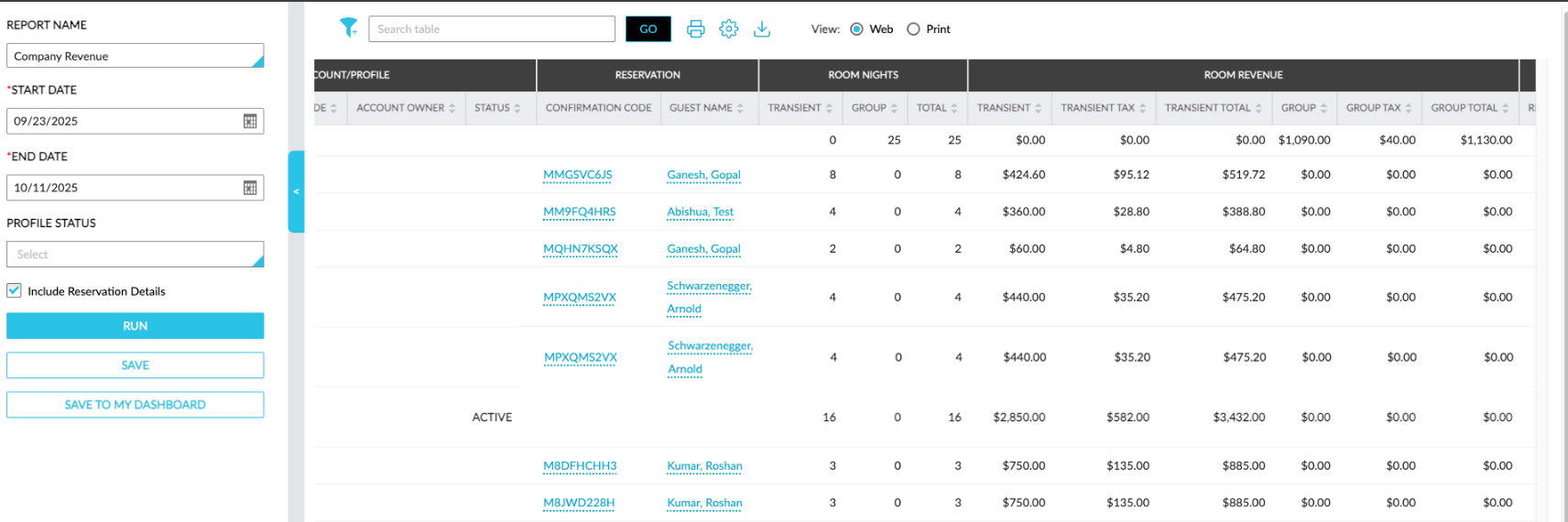
Sample Report
Report Fields
This report displays the following fields:
|
Field |
Description |
|---|---|
|
Account Type |
|
|
Account Type |
The account type of the account. |
|
Account/Profile |
|
|
Name |
The company profile name. This column can be filtered and sorted. |
|
Company Code |
The company profile code. This column can be filtered and sorted. |
|
Account Owner |
The account owner of the company profile displayed as a hyperlink. When clicked, users will be redirected to the account owner profile. This column can be filtered and sorted. Users can search for a record using this value. |
|
Status |
The status of the profile, that is, Active or Archived. This column can be filtered and sorted. Users can search for a record using this value. |
|
Property |
|
|
Name |
The property name. This column can be filtered. |
|
Address |
|
|
Address |
The address configured for the company profile. |
|
|
The email address configured for the company profile. |
|
Phone Number |
The phone number configured for the company profile. |
|
Contact Person |
The contact person configured for the company profile. |
|
Reservation |
|
|
Confirmation Code |
The confirmation code of the reservation associated with the company profile displayed as a hyperlink. When clicked, users will be navigated to the respective reservation. This column can be filtered and sorted. Users can search for a record using this value. |
|
Guest Name |
The guest name associated with the reservation displayed as a hyperlink. When clicked, users will be navigated to the respective profile. This column can be filtered and sorted. Users can search for a record using this value. |
|
Room Nights |
|
|
Transient |
The total number of room nights for transient reservations associated with the company profile. This column can be sorted. |
|
Group |
The total number of room nights for group reservations associated with the company profile. This column can be sorted. |
|
Total |
The total number of transient and group room nights associated with the company profile. This column can be sorted. |
|
Room Revenue |
|
|
Transient |
The total revenue generated from transaction items for transient reservations where the Room Revenue flag is enabled, while excluding taxes. For future reservations, the charges scheduled to be posted will be considered. This column can be sorted. |
|
Transient Tax |
The total tax applied to the income generated from transient reservations with the Room Revenue flag enabled. For future reservations, the tax for the charges scheduled to be posted will be considered. This column can be sorted. |
|
Transient Total |
The total revenue including tax generated from transaction items for transient reservations with the Room Revenue flag enabled. This column can be sorted. |
|
Group |
The total revenue generated from transaction items for group reservations with the Room Revenue flag enabled and the revenue from remaining room blocks while excluding taxes. For future reservations, the charges scheduled to be posted will be considered. This column can be sorted. |
|
Group Tax |
The total tax applied to income generated from group reservations with the Room Revenue flag enabled and the revenue from remaining room blocks. For future reservations, the tax for the charges scheduled to be posted will be considered. This column can be sorted. |
|
Group Total |
The total revenue including tax generated from transaction items for group reservations with the Room Revenue flag enabled and the revenue from remaining room blocks. This column can be sorted. |
|
Company Room Revenue |
|
|
Revenue |
The total revenue generated from transaction items posted in the account receivable section (routed or manual posting) when the Room Revenue flag is enabled, while excluding taxes. This column can be sorted. |
|
Tax |
The total tax applied to the income generated from transaction items posted in the account receivable section (routed or manual posting) when the Room Revenue flag is enabled. This column can be sorted. |
|
Total |
The total revenue including tax generated from transaction items posted in the account receivable section (routed or manual posting) when the Room Revenue flag is enabled. This column can be sorted. |
|
ADR |
|
|
Transient |
The total transient room revenue by total transient room nights. This column can be sorted. |
|
Group |
The total group room revenue by total group room nights. This column can be sorted. |
|
Total |
The total group and transient room revenue by total group and transient room nights. This column can be sorted. |
|
Other Revenue |
|
|
Transient |
The total revenue generated from transaction items for transient reservations where the Room Revenue flag is disabled, while excluding taxes. For future reservations, the charges scheduled to be posted will be considered. This column can be sorted. |
|
Transient Tax |
The total tax applied to the income generated from transient reservations with the Room Revenue flag disabled. For future reservations, the tax for the charges scheduled to be posted will be considered. This column can be sorted. |
|
Transient Total |
The total revenue including tax generated from transaction items for transient reservations with the Room Revenue flag disabled. This column can be sorted. |
|
Group |
The total revenue generated from transaction items for group reservations with the Room Revenue flag disabled and the revenue from remaining room blocks while excluding taxes. For future reservations, the charges scheduled to be posted will be considered. This column can be sorted. |
|
Group Tax |
The total tax applied to income generated from group reservations with the Room Revenue flag disabled and the revenue from remaining room blocks. For future reservations, the tax for the charges scheduled to be posted will be considered. This column can be sorted. |
|
Group Total |
The total revenue including tax generated from transaction items for group reservations with the Room Revenue flag disabled and the revenue from remaining room blocks. This column can be sorted. |
|
Company Other Revenue |
|
|
Revenue |
The total revenue generated from transaction items posted in the account receivable section (routed or manual posting) when the Room Revenue flag is disabled, while excluding taxes. This column can be sorted. |
|
Tax |
The total tax applied to the income generated from transaction items posted in the account receivable section (routed or manual posting) when the Room Revenue flag is disabled. This column can be sorted. |
|
Total |
The total revenue including tax generated from transaction items posted in the account receivable section (routed or manual posting) when the Room Revenue flag is disabled. This column can be sorted. |
|
Market Segment |
|
|
Market Segment |
The market segment associated with the company profile. This column can be filtered. |
|
Source Of Business |
|
|
Source Of Business |
The source of business value associated with the company profile. This column can be filtered. |
|
Activity Dates |
|
|
Last Booking Date |
The date of the last booking made using the profile. This column can be sorted. |
|
Last Checkout Date |
The date of the last checkout of the profile. This column can be sorted. |